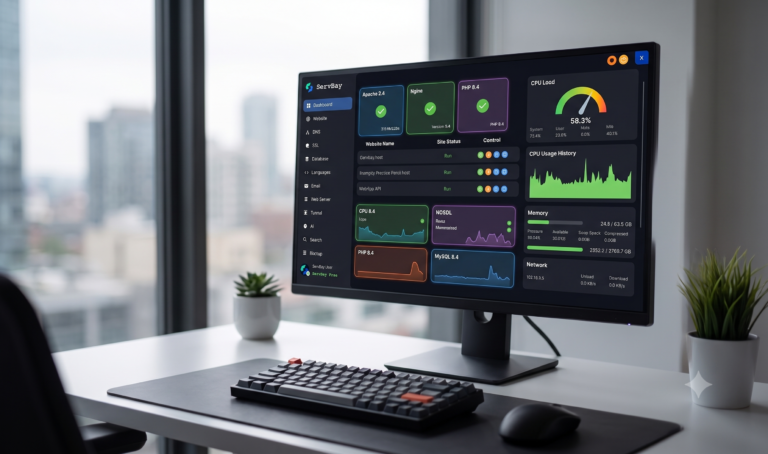
Switching your primary development environment can transform your daily programming workflow. Modern developers frequently rely on ServBay local development to replace legacy tools like Laragon and XAMPP. In addition, modern web stacks require seamless support for multi-language runtimes, unified SSL management, and granular resource monitoring. Consequently, making the switch to an all-in-one local platform eliminates tedious manual configuration.
Quick Summary: Key Takeaways
- Unified Multi-Stack Support: Run PHP, Node.js, Python, Go, Rust, Java, and Ruby simultaneously without port conflicts.
- Modern Service Architecture: Out-of-the-box support for Apache, Nginx, MySQL, MariaDB, PostgreSQL, Redis, and Memcached.
- Real-Time Diagnostics: Built-in telemetry tracking CPU usage, memory allocation, and live network throughput.
- Automated Tooling: One-click local SSL certificates, internal DNS routing, and reverse tunneling.
Why Migrate to a ServBay Local Development Stack from Laragon?
For years, developers praised Laragon for its isolated portability and speed on Windows. However, development demands have shifted toward polyglot stacks and automated microservices. Therefore, upgrading to modern tools provides essential architectural upgrades.
+------------------------+--------------------------+--------------------------+
| Feature / Metric       | ServBay                  | Laragon                  |
+------------------------+--------------------------+--------------------------+
| Operating System       | macOS & Windows          | Windows Only             |
| Multi-Version Runtime  | Simultaneous Running     | Single Active Switch     |
| Modern UI Telemetry    | Live CPU/RAM/Network     | Basic Tray Menu          |
| Native Non-PHP Stacks  | Node, Go, Rust, Ruby     | Limited / Manual Addon   |
| Integrated NoSQL       | Redis & Memcached Built-in | Requires Manual Setup  |
+------------------------+--------------------------+--------------------------+
Furthermore, managing multiple projects with conflicting PHP or Node.js versions often breaks local workflows. ServBay solves this hurdle by allowing distinct environments to run side-by-side. As a result, teams save countless hours on environment debugging. You can check our guide on Optimizing local PHP performance to fine-tune your configuration.
ServBay Local Development: Core Advantages and Disadvantages
Every development platform comes with distinct trade-offs. Examining these pros and cons helps clarify whether this environment matches your project requirements.
Advantages of the Platform
- Zero-Configuration Multi-Runtime: You can run PHP 8.4 alongside Node.js 24 and Go without manual port reassignment.
- Comprehensive Database Management: In addition, you get pre-configured instances of MySQL 8.4, MariaDB, PostgreSQL, Redis, and Memcached.
- Built-in Production Tools: The platform includes reverse tunneling, local DNS routing, mail catching, and automated SSL creation.
- Hardware Efficiency: It uses optimized binary packages instead of heavy Docker virtualization layers.
Disadvantages to Consider
- Platform Learning Curve: The extensive sidebar interface presents many advanced options that beginners might find overwhelming at first.
- Tier Limitations: Some advanced collaboration and automated backup features require a paid subscription tier.
Exploring the ServBay Local Development Interface
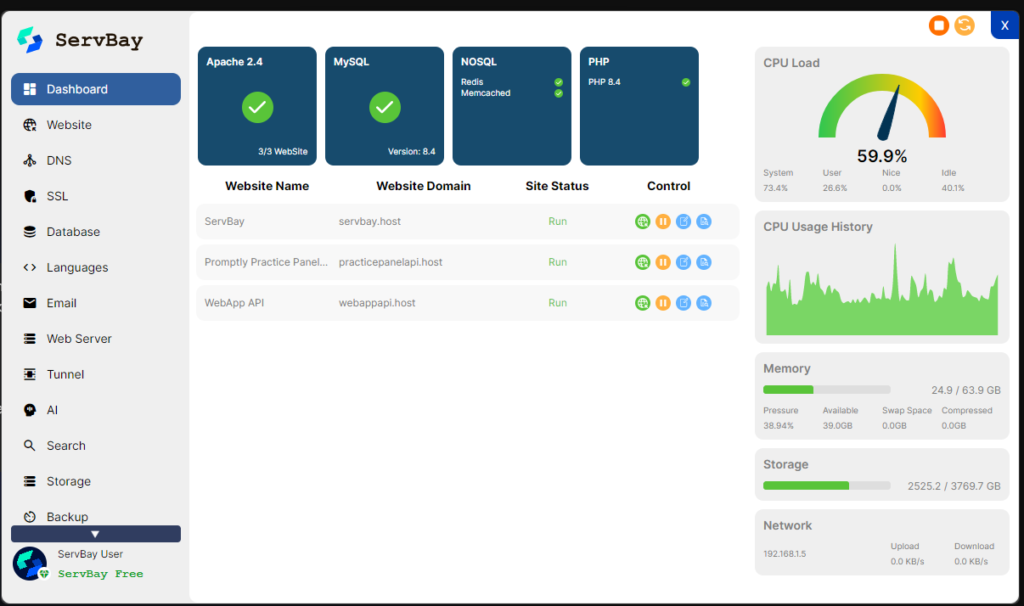
The primary user interface centralizes all server operations into clear, dedicated control panels.
1. The Main Dashboard Overview
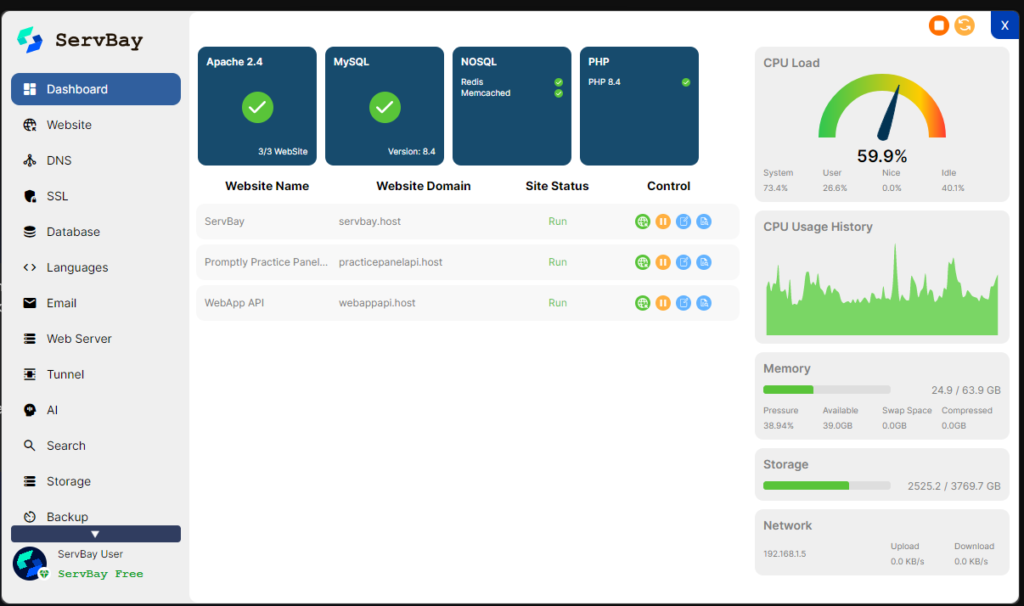
First, the top service cards provide instant visual feedback on active daemons, including Apache 2.4, MySQL 8.4, Redis, Memcached, and PHP 8.4. Next, the central table lists your active virtual hosts (such as servbay.host and webappapi.host) along with fast controls to launch, pause, or edit configurations.
Moreover, the right-hand panel displays comprehensive real-time hardware telemetry:
- CPU Load & History: A dynamic gauge tracks current utilization alongside a rolling timeline graph.
- Memory Pressure: Live metrics report allocated RAM, available memory, and swap space.
- Disk & Network: Visual progress bars monitor disk allocation alongside live upload and download throughput.
2. Comprehensive Navigation Sidebar
The left sidebar contains dedicated modules for managing your entire infrastructure:
- Website & DNS: Configure custom domain names and manage local DNS resolutions effortlessly.
- SSL: Generate and bind trusted local SSL certificates for HTTPS testing.
- Languages & Web Server: Toggle Apache or Nginx and configure runtime extensions.
- Tunnel & AI: Expose local sites to public endpoints and access integrated developer utilities.
- Search, Storage & Backup: Maintain databases, manage local packages, and create snapshot archives.
Configuring Runtimes via the ServBay Local Server Settings
Customizing default package versions takes only a few clicks inside the configuration panel.
Global Runtime and Service Configuration
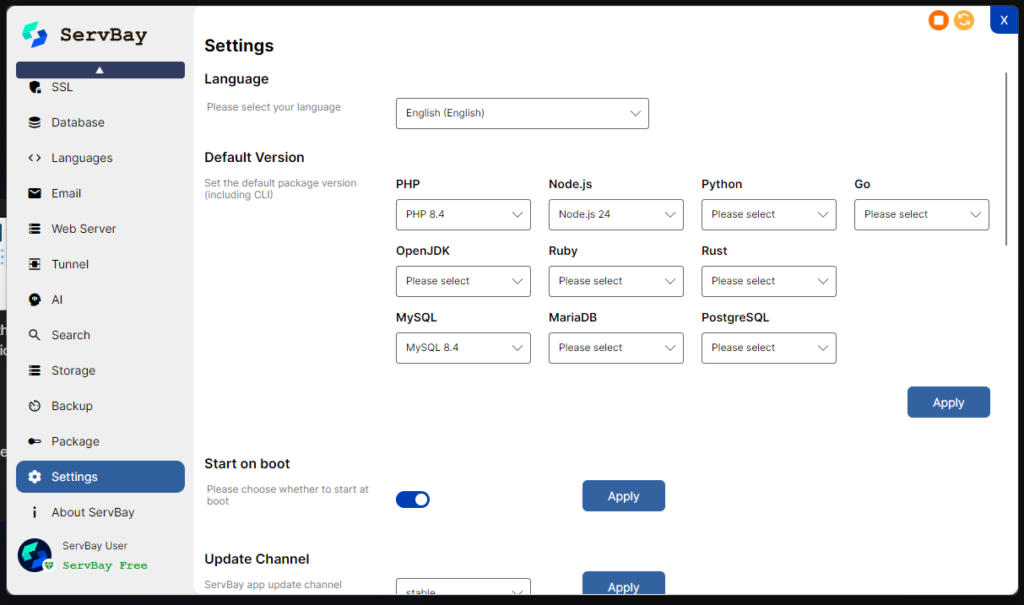
Specifically, the settings window lets you designate global default CLI runtimes across ten distinct technologies:
- Scripting & Backend: PHP, Node.js, Python, Go, Ruby, Rust, and OpenJDK.
- Database Engines: Set preferred defaults for MySQL, MariaDB, and PostgreSQL.
- System Controls: Toggle automatic launch at boot and select software update release channels.
For official runtime specifications, explore the Official PHP documentation on runtime configurations.
Step-by-Step Installation and Setup Guide
Setting up your environment requires minimal effort. Follow these direct steps to initialize your local web stack:
- Download the Installer: Grab the official installer package from the provider’s portal.
- Execute Setup: Run the installation wizard and select your desired initial packages.
- Initialize Services: Open the dashboard and start Apache, MySQL, and your required PHP version.
- Create a Virtual Host: Navigate to the Website tab, click Add, and assign a local domain name.
- Verify HTTPS: Enable the integrated SSL toggle to browse your local application securely.
For additional database setup tips, review our tutorial on Managing local MySQL databases efficiently. You can also verify standards via the W3C Web standards guidelines.
Frequently Asked Questions
Is ServBay local development free to use?
Basically, the platform offers a fully functional free tier. Consequently, it covers standard local web development needs easily.
Can I run multiple PHP versions at the same time?
Certainly, you can assign different PHP versions to individual virtual hosts. Furthermore, this occurs concurrently without manual port mapping.
How does this tool compare to Docker?
Specifically, it runs native binaries directly on your operating system. As a result, it consumes significantly fewer system resources than Docker.
Can I migrate my databases from Laragon?
Certainly, you can export your SQL dump files from Laragon. Subsequently, you import them directly using the integrated database tools.