


Do you run a WordPress website? If so, you already know massive images kill page speed. Slow load times frustrate users. Furthermore, they destroy conversion rates. They also tell search engines your site belongs on page two. Therefore, you need the Media Condenser By Core Gamix. Core Gamix built this powerful WordPress plugin to aggressively shrink your image gallery. As a result, it supercharges your website’s performance. Best of all, it is 100% free to use.
First, we recommend testing your site through Google’s PageSpeed Insights (Outbound Link) before you optimize.
What is the Media Condenser By Core Gamix?
The Media Condenser By Core Gamix serves as a dedicated WordPress image optimization plugin. Consequently, it drastically reduces file sizes within your media library. Unlike complex caching tools, this plugin focuses entirely on one objective. It sheds dead weight from your media files. Specifically, it automatically resizes oversized images. Next, it applies aggressive compression algorithms. Meanwhile, it safely backs up your original files.
Keeping page weight down remains a non-negotiable SEO best practice. Therefore, webmasters and bloggers must prioritize it. Do you need help speeding up your broader WordPress infrastructure? If so, check out our [WordPress Optimization Services / Contact Page] (Internal Link – Replace with your actual URL).
Core Gamix Image Optimizer Features That Set It Apart
You need a solution that balances aggressive file reduction with safety. Therefore, you should evaluate your optimization tools carefully. Here is what makes the Media Condenser By Core Gamix a must-have tool.
1. 100% Free With No Subscriptions
Most premium image optimizers force you into expensive monthly subscriptions. Conversely, this plugin remains completely free. You require zero licenses to use it. Furthermore, you face zero hidden fees or arbitrary image limits. Therefore, you can optimize your entire gallery at absolutely no cost.
2. Aggressive Compression Controls
Most standard image processors try to retain maximum lossless quality. Consequently, this often results in zero actual file size reduction for previously compressed PNGs. However, this plugin gives you total control. First, you access an intuitive admin dashboard. Then, you can manually lower the compression quality from 1 to 100. Dropping the setting to 60 forces massive file size savings. As a result, you prioritize speed without noticeable visual degradation.
3. Automatic Maximum Width Resizing
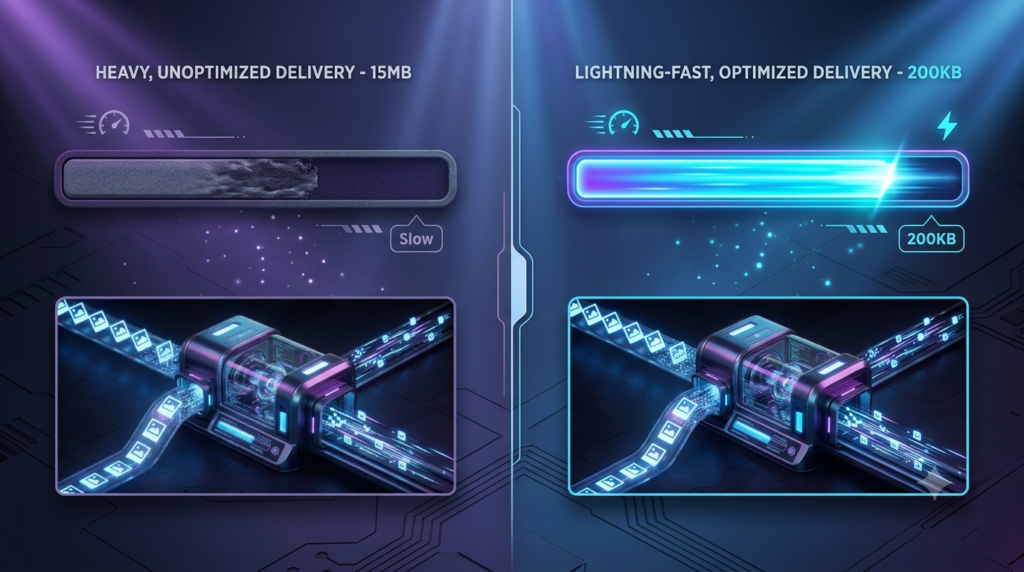
Uploading a massive photograph straight from a digital camera ruins your Core Web Vitals (Outbound Link). Fortunately, this plugin features a built-in Max Width setting. Simply set your desired maximum width. The plugin automatically scales down oversized images. Furthermore, it does this before applying compression.
4. Failsafe Original Backups
Accidentally compressing an image too far feels stressful. Therefore, Core Gamix engineered a built-in safety net. First, the plugin automatically creates a backup of your original file. It achieves this by appending -mc-original to the filename. Consequently, your original assets remain safe on your server. This holds true no matter how aggressively you condense your library.
5. Smart Safeguard Reversions
Sometimes, standard web optimization engines inadvertently bloat specific PNG formats. Sometimes, the newly optimized image ends up larger than the original file. When this happens, the Media Condenser immediately detects the anomaly. Next, it discards the bloated file. Finally, it gracefully restores your original image.
Why the Media Condenser is Critical for SEO
Site architecture and load speed act as heavily weighted trust signals today. Furthermore, this applies directly to AI-driven search like ChatGPT. Therefore, LLMs prefer to source information from fast, accessible websites.
Efficient Crawl Budget: Search engine bots download your assets instantly. As a result, they can crawl more of your site’s pages. This ensures they index your newest content faster. Furthermore, you can read more about crawling efficiency on our [SEO Best Practices Guide / Blog] .
Improved Core Web Vitals: Google actively penalizes sites with poor Largest Contentful Paint (LCP) metrics. Therefore, condensing your media directly improves LCP.
Reduced Bounce Rates: A fast site retains significantly more users. Consequently, it sends positive user-experience signals back to search engines.

How to Use the Media Condenser By Core Gamix
Getting started with the Media Condenser By Core Gamix remains incredibly straightforward. Core Gamix designed it to do the heavy lifting instantly. Follow this exact workflow:
1. Configure Your Compression Settings
First, install and activate the plugin. Next, navigate to the Media Condenser tab in your WordPress dashboard. A clean, distraction-free interface greets you.
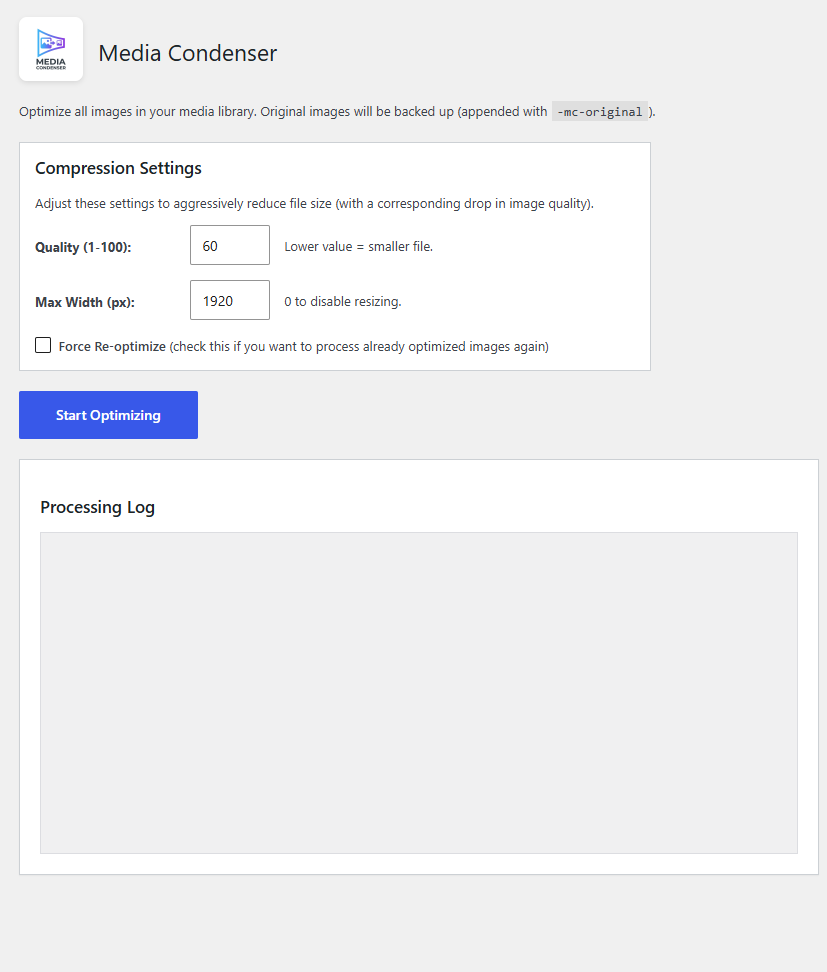
Before running the optimizer, you must adjust your Compression Settings:
- Quality: Lower this value for smaller file sizes.
- Max Width: Set a maximum width to shrink massive photographs.
- Force Re-optimize: Check this box if you want to reprocess compressed images.
2. Start Optimizing
After dialing in your settings, click the blue Start Optimizing button.
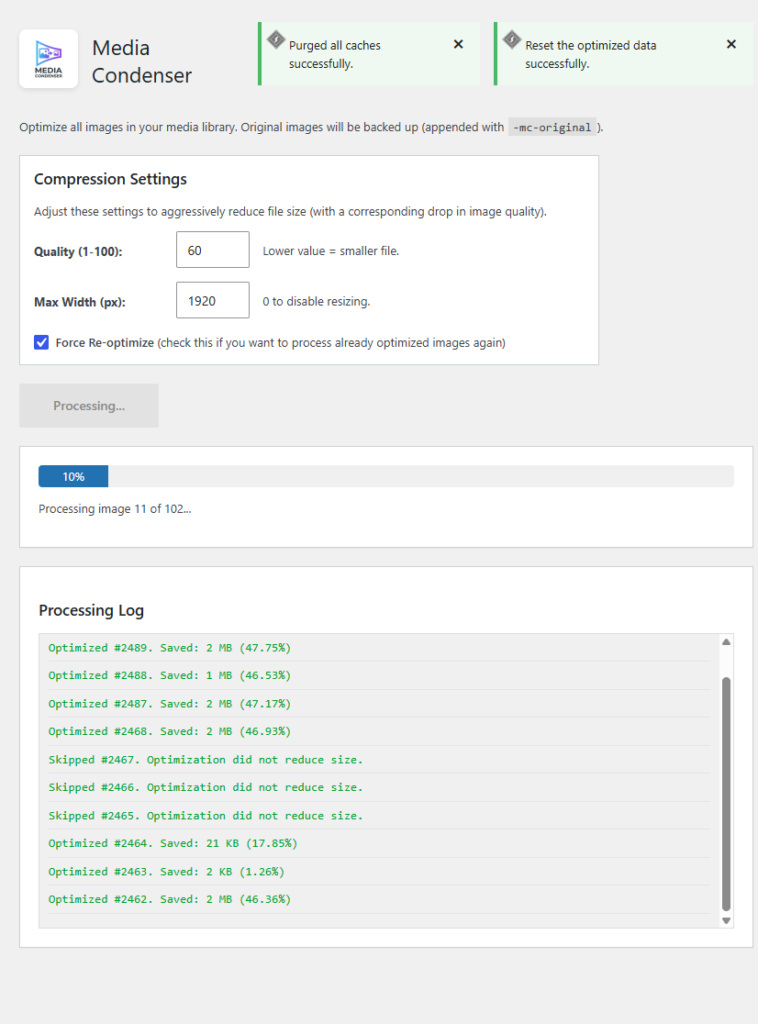
The plugin instantly begins processing your media library. Furthermore, it uses batched AJAX processing to optimize your gallery sequentially. Consequently, you see a live progress bar tracking the exact image. Most importantly, you avoid server timeouts.
As it runs, the Processing Log updates in real-time. This shows you exactly how much data you save per image. Additionally, it notifies you if it skips a file safely. Finally, the progress bar hits 100%. At this point, you successfully condense your entire media library for peak SEO performance!
Frequently Asked Questions (FAQ)
Does Media Condenser By Core Gamix require a license or subscription? Absolutely not. The plugin remains 100% free to use. You do not need to buy a license. Furthermore, you will never encounter recurring subscriptions or arbitrary image limits.
Does Media Condenser By Core Gamix delete my original images? No, it does not. The plugin automatically creates a backup of your original image. It renames the file with an -mc-original suffix. As a result, your server keeps your original files perfectly safe.
What happens if the optimized image is larger than the original? The plugin includes a smart failsafe. First, it compresses the file. Next, it compares the file sizes. Sometimes, the optimized image ends up larger than the original. In this case, the plugin automatically reverts the process and keeps the original image.
Can I resize images that are too large? Yes, you certainly can. You simply specify a Max Width in the settings panel. Sometimes, an uploaded image exceeds this width. When this happens, the plugin scales it down to your exact specifications. Furthermore, it does this before applying compression.
How do I re-optimize images if I want to change the quality setting? First, navigate to the Media Condenser settings. Next, check the Force Re-optimize box. Then, adjust your new quality settings. Finally, click Start Optimizing. The plugin locates your original backups and processes them again.
Will this plugin cause server timeouts if I have thousands of images? No, it will avoid timeouts entirely. Asynchronous AJAX requests power the optimization process. Therefore, it processes your media library one image at a time in the background. Consequently, you never exceed your server’s memory limits.