


Mastering Angular incremental hydration transforms web performance instantly. Specifically, web developers often face massive challenges with slow page loads. However, Angular 22 offers powerful, modern solutions. For example, route-level render modes give you ultimate control over content delivery. As a result, users enjoy lightning-fast browsing experiences. Furthermore, search engines index your pages perfectly. Therefore, implementing these new strategies is absolutely essential.
Quick Summary
- This powerful technique defers heavy JavaScript loading for non-critical visual elements.
- Consequently, your Largest Contentful Paint (LCP) score improves dramatically.
- Route-level render modes allow custom server rendering per individual page.
- For instance, developers can mix CSR, SSR, and SSG effortlessly.
- Finally, hybrid rendering maximizes both SEO visibility and overall user experience.
Understanding Angular SSR Optimization
Server-side rendering (SSR) generates raw HTML directly on your web server. Previously, Angular destroyed and rebuilt the entire DOM. Because of this, users experienced a very frustrating UI flicker. Angular incremental hydration solves this exact problem completely. Instead of rebuilding everything, Angular reuses the existing HTML structure. Furthermore, it attaches event listeners seamlessly in place. Therefore, the browser skips heavy JavaScript processing initially.
Why Advanced Hydration Matters
First, this technique drastically reduces the initial JavaScript payload size. Consequently, your web application becomes fully interactive much sooner. For example, users can click navigation buttons without any noticeable delay. In addition, mobile devices handle the parsing phase very easily. Importantly, this approach scales exceptionally well for complex enterprise applications.
Core Web Vitals and Angular SSR
Google ranks websites strictly based on Core Web Vitals metrics. Because of this, web performance optimization remains your top priority. Angular incremental hydration directly improves First Input Delay (FID). Moreover, it practically eliminates Cumulative Layout Shift (CLS) completely. Specifically, elements stay exactly where they belong during the page loading phase. As a result, your organic SEO rankings skyrocket immediately.
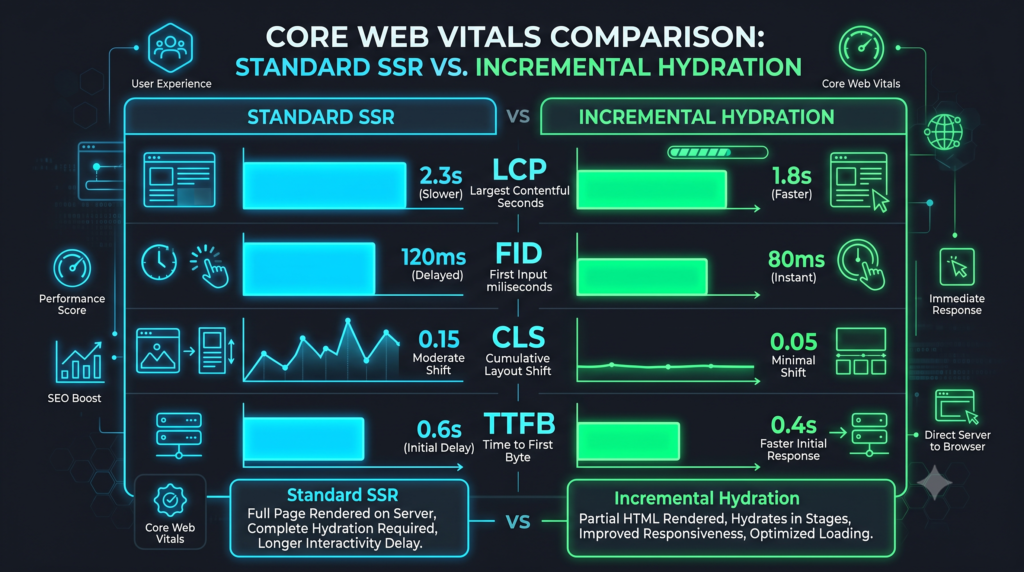
Route-Level Render Modes for Angular Incremental Hydration
Angular 22 supports advanced hybrid rendering setups out of the box. Specifically, developers use route-level render modes to customize behavior. Therefore, you can optimize each webpage individually. On the other hand, a single rendering strategy rarely fits every scenario.
Client-Side vs Server-Side SSR Strategies
Client-side rendering (CSR) handles private user dashboards perfectly. However, CSR harms public search visibility significantly. Meanwhile, server-side rendering (SSR) serves dynamic public pages very efficiently. For instance, e-commerce product pages thrive on robust SSR solutions. Because of this, search engines index the latest product prices instantly.
Read our ultimate guide on Angular performance tuning
Configuring Hybrid Rendering for Angular SSR
Angular provides three distinct rendering options natively. First, RenderMode.Client processes everything inside the user’s browser. Next, RenderMode.Server generates fresh HTML per individual network request. Finally, RenderMode.Prerender builds static files securely during deployment. Consequently, hybrid rendering combines these exact modes seamlessly.
Learn more about Core Web Vitals from Google Developers
Setting Up SSR in Angular 22
Upgrading to Angular 22 enables these powerful features instantly. First, you must generate a new project with the --ssr flag. Next, configure your primary routing module very carefully. Furthermore, you will wrap non-critical components tightly in @defer blocks.

Step-by-Step Angular SSR Implementation
Indeed, implementing these robust tools requires absolute precision. First, update your angular.json file appropriately. Next, define your server routes clearly within the application configuration. For example, assign RenderMode.Server to your dynamic API endpoints. As a result, Angular optimizes the content delivery automatically.
View the official Angular SSR documentation
4. FAQ Section
Frequently Asked Questions
What is Angular Incremental Hydration?
This advanced capability defers JavaScript loading for specific page sections. Consequently, it improves initial load times and responsiveness significantly.
How do route-level render modes work?
Route-level render modes allow specific rendering strategies per URL. For instance, you can mix SSR, CSR, and pre-rendering easily. Therefore, overall performance improves across the entire app.
Why use hybrid rendering in Angular 22?
Hybrid rendering targets exact user needs per individual page. Specifically, it boosts SEO for public pages while reducing server costs. Furthermore, it enhances the overall developer experience instantly.
Does this replace lazy loading?
No, this modern technique complements lazy loading perfectly. In fact, they work together seamlessly on complex pages. As a result, you achieve maximum application efficiency effortlessly.
![Zoneless Angular 22 Apps: [Ultimate] Performance Guide](https://coregamix.com/wp-content/uploads/2026/08/Gemini_Generated_Image_sl7y99sl7y99sl7y-scaled.png)