
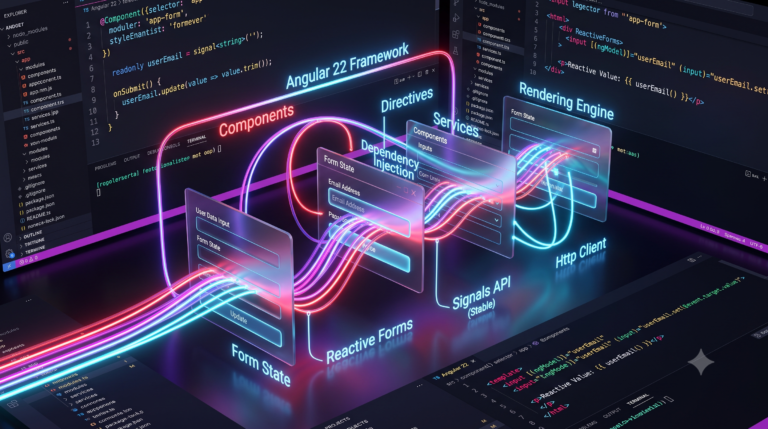
Angular 22 introduces a refined, reactive form architecture for enterprise frontend engineering. Consequently, planning a stable signal forms migration allows development teams to eliminate legacy RxJS boilerplate and simplify type checking.
Historically, developers relied heavily on complex control trees like FormGroup and FormArray. However, those classes often required manual memory management and verbose lifecycle tracking. In contrast, modern signal forms bind your user interface directly to fine-grained state signals. Furthermore, this architectural shift streamlines change detection and boosts overall application speed. Therefore, migrating your forms early yields substantial long-term maintainability gains.
Key Takeaways
- Native Fine-Grained Reactivity: Replaces unmanaged RxJS
valueChangesobservables with auto-trackingcomputed()signals. - Direct Model State: Derives typed schema rules directly from a single writable source signal.
- Zero Memory Leaks: Eliminates manual subscription management and teardown logic completely.
- Gradual Interoperability: Uses the official
compatFormbridge to refactor massive enterprise codebases incrementally without downtime.
What Are Signal Forms in Angular 22?
Angular Signal Forms provide a reactive form management architecture built directly on native framework signals, replacing imperative control instances with declarative, auto-tracked schemas.
In classic architectures, your application synchronizes state between form controllers and separate data objects manually. Because of this friction, subtle UI synchronization bugs frequently emerge. Signal forms solve this issue completely. Specifically, your writable signal serves as the single source of truth. Therefore, the form updates validation states and computed values immediately whenever input data changes. In addition, you avoid tricky manual subscription teardown logic.
Angular Signals Complete Guide for Beginners
Reactive Forms vs. Signal Forms
The following table summarizes the architectural differences between both form systems:
| Architectural Metric | Classic Reactive Forms | Stable Signal Forms (Angular 22) |
| State Storage | Imperative FormGroup instances | Native Writable signal() |
| Value Observation | RxJS valueChanges Observables | Auto-tracked computed() signals |
| Type Precision | Often loose or nullable | Inferred strict TypeScript interfaces |
| Cross-Field Validation | Manual control references | Reactive dependency reads via valueOf() |
| Dynamic Lists | Imperative FormArray operations | Standard immutable array transformations |
Prerequisites Before Migrating
Before starting your refactoring process, verify that your local workspace meets these basic requirements:
- First, update your project dependencies to Angular 22 using the official Angular CLI:Bash
ng update @angular/core@22 @angular/cli@22 - Next, ensure that
strict: trueremains active in yourtsconfig.jsonfile. - Finally, install the new forms package from
@angular/forms/signals.
Official Angular CLI Update Documentation
Step-by-Step Practical Migration Workflow
Executing a structured stable signal forms migration ensures seamless deployment across enterprise projects. Therefore, follow this proven five-step process to modernize your codebase safely

Step 1: Replace FormGroup with a Writable Signal
First, locate your existing component’s FormGroup definition. For example, consider this legacy user profile setup:
TypeScript
// Legacy Reactive Forms approach
import { Component, OnInit } from '@angular/core';
import { FormBuilder, FormGroup, Validators } from '@angular/forms';

@Component({
  selector: 'app-user-profile',
  templateUrl: './user-profile.component.html'
})
export class UserProfileComponent implements OnInit {
  profileForm!: FormGroup;

  constructor(private fb: FormBuilder) {}

  ngOnInit(): void {
    this.profileForm = this.fb.group({
      username: ['', [Validators.required, Validators.minLength(3)]],
      email: ['', [Validators.required, Validators.email]],
      age: [18, [Validators.min(18)]]
    });
  }
}
Now, refactor the component using the declarative form() factory function:
TypeScript
// Modern Signal Forms approach
import { Component, signal } from '@angular/core';
import { form, required, minLength, email, min } from '@angular/forms/signals';

@Component({
  selector: 'app-user-profile',
  standalone: true,
  templateUrl: './user-profile.component.html'
})
export class UserProfileComponent {
  // 1. Declare the data model signal
  protected userModel = signal({
    username: '',
    email: '',
    age: 18
  });

  // 2. Build the signal form schema
  protected profileForm = form(this.userModel, (schema) => {
    required(schema.username);
    minLength(schema.username, 3);

    required(schema.email);
    email(schema.email);

    min(schema.age, 18);
  });
}
As a result, your component initializes without lifecycle hooks or constructor injections. Furthermore, the form model derives exact TypeScript types automatically.
Step 2: Update Your Template Directives
Next, update your HTML template bindings. Specifically, replace legacy formControlName directives with the modern [formField] input binding.
HTML
<form (submit)="saveProfile()">
  <div class="field-group">
    <label for="username">Username</label>
    <input
      id="username"
      type="text"
      [formField]="profileForm.username"
    />

    @if (profileForm.username().touched() && profileForm.username().invalid()) {
      <p class="error">Username must contain at least 3 characters.</p>
    }
  </div>

  <div class="field-group">
    <label for="email">Email Address</label>
    <input
      id="email"
      type="email"
      [formField]="profileForm.email"
    />
  </div>

  <button type="submit" [disabled]="profileForm().invalid()">
    Save Changes
  </button>
</form>
Moreover, notice the clear separation of concerns in the template. In particular, you pass profileForm.username to the directive, while profileForm.username() accesses the reactive validation state directly. Consequently, your UI updates cleanly on every user stroke.
Step 3: Configure Cross-Field Validation
Legacy forms relied on custom multi-control validator functions to compare separate values. In contrast, signal forms make cross-field validation effortless using the valueOf() helper.
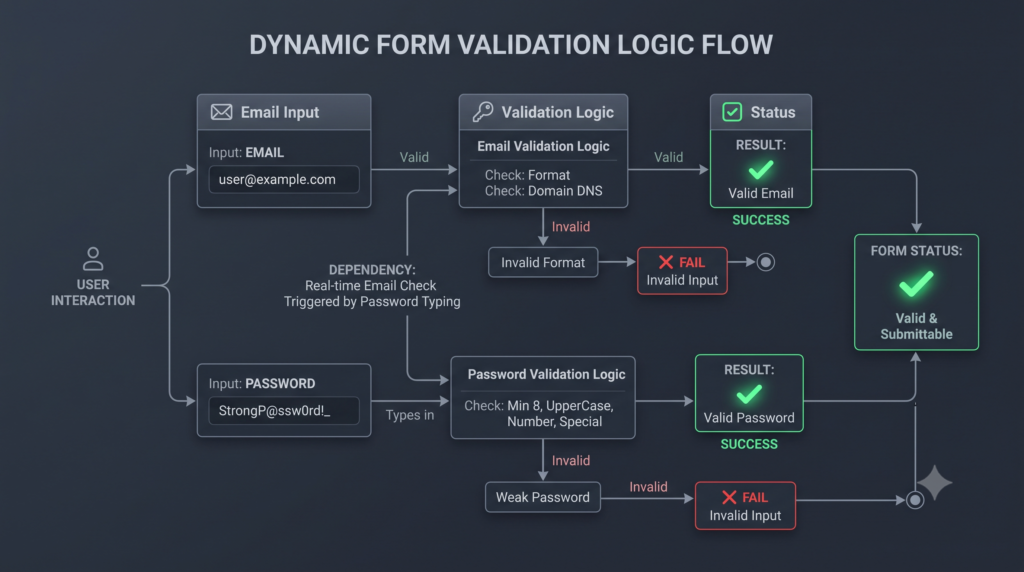
For instance, consider this password confirmation implementation:
TypeScript
import { form, required, validate, customError } from '@angular/forms/signals';

this.securityForm = form(this.securityModel, (schema) => {
  required(schema.password);
  required(schema.confirmPassword);

  // Validate passwords match reactively
  validate(schema.confirmPassword, ({ value, valueOf }) => {
    const primaryPassword = valueOf(schema.password);

    if (value() !== primaryPassword) {
      return customError({
        kind: 'passwordMismatch',
        message: 'Passwords do not match.'
      });
    }
    return undefined;
  });
});
Because the runtime tracks signal reads automatically, updating the primary password triggers validation on the confirmation field instantly. As a result, you no longer need manual update event listeners.
Step 4: Handle Dynamic Collections Using applyEach
Legacy applications frequently use FormArray for dynamic input rows. However, FormArray often creates rigid code and cumbersome index lookups. In Angular 22, you manage collections by mutating standard arrays inside your writable signal instead.
TypeScript
import { Component, signal } from '@angular/core';
import { form, required, applyEach } from '@angular/forms/signals';

interface PhoneNumber {
  label: string;
  number: string;
}

@Component({
  selector: 'app-contact-list',
  standalone: true,
  templateUrl: './contact-list.component.html'
})
export class ContactListComponent {
  protected contactsModel = signal<{ phones: PhoneNumber[] }>({
    phones: [{ label: 'Mobile', number: '' }]
  });

  protected contactForm = form(this.contactsModel, (schema) => {
    applyEach(schema.phones, (phoneSchema) => {
      required(phoneSchema.label);
      required(phoneSchema.number);
    });
  });

  addPhone(): void {
    this.contactsModel.update((state) => ({
      ...state,
      phones: [...state.phones, { label: 'Office', number: '' }]
    }));
  }

  removePhone(index: number): void {
    this.contactsModel.update((state) => ({
      ...state,
      phones: state.phones.filter((_, i) => i !== index)
    }));
  }
}
Therefore, your team can add or remove items using standard immutable JavaScript operations. Furthermore, the signal schema maintains strict validation rules across every dynamic element automatically.
Step 5: Implement Gradual Migration with compatForm
Rewriting massive enterprise applications overnight introduces significant deployment risks. Fortunately, the @angular/forms/signals/compat package provides a seamless transition layer.
Specifically, you can embed legacy FormControl instances inside a signal schema using compatForm:
TypeScript
import { signal } from '@angular/core';
import { FormControl, Validators } from '@angular/forms';
import { compatForm, required } from '@angular/forms/signals/compat';

export class CheckoutComponent {
  // Legacy control containing existing custom business logic
  protected legacyTaxControl = new FormControl('', {
    validators: [Validators.required],
    nonNullable: true
  });

  // Hybrid model combining signal state with legacy controls
  protected checkoutModel = signal({
    customerName: '',
    taxId: this.legacyTaxControl
  });

  protected checkoutForm = compatForm(this.checkoutModel, (schema) => {
    required(schema.customerName);
  });
}
Consequently, your developers can migrate high-priority views first while preserving legacy components until future sprint cycles. Moreover, this hybrid strategy eliminates disruptive rewrites across large development teams.
TypeScript Official Handbook on Strict Type Checking
Best Practices for Production Readiness
- Maintain Immutable State Updates: Always modify your data model using
.update()or.set()methods to ensure consistent signal triggers. - Restore Global CSS Status Classes: Signal forms omit default DOM classes for speed. However, you can restore them globally by configuring
provideSignalFormsConfig({ classes: NG_STATUS_CLASSES }). - Derive State via Computed Signals: Use native
computed()values to calculate submit button eligibility or dynamic summaries effortlessly. - Encapsulate Reusable Schemas: Extract repeated validation rules into standalone helper functions across multiple feature modules.
Frequently Asked Questions
Are legacy Reactive Forms deprecated in Angular 22?
No, legacy Reactive Forms are not deprecated in Angular 22. Instead, they remain supported for backward compatibility. However, completing a stable signal forms migration represents the recommended approach for modern Angular applications.
How do Signal Forms handle asynchronous backend validation?
Signal Forms handle async validation by returning a Promise or Observable inside the validate function. In addition, each field provides an .evaluating() signal to display loading indicators during network requests.
Why are standard CSS validation classes missing from input elements?
Signal forms omit .ng-invalid and .ng-touched classes by default to maximize rendering performance. However, you can restore these classes globally across your application by registering provideSignalFormsConfig with NG_STATUS_CLASSES.
Can I build reusable custom form controls without ControlValueAccessor?
Yes, you can build custom form components without ControlValueAccessor. Specifically, you can bind custom input widgets directly using standard Angular model() signal inputs. Consequently, custom form development becomes much simpler.put widgets directly using standard Angular model() signal inputs.

![Zoneless Angular 22 Apps: [Ultimate] Performance Guide](https://coregamix.com/wp-content/uploads/2026/08/Gemini_Generated_Image_sl7y99sl7y99sl7y-scaled.png)