

Angular 22 Resource API is the new feature introduced in version 20. Modern frontend applications require predictable state management. For years, Angular developers relied heavily on RxJS streams and manual subscription tracking to fetch remote data. However, complex asynchronous orchestration frequently introduced boilerplate code and memory leaks.
Angular stabilizes the long-awaited Resource API. Consequently, developers can now bind asynchronous operations directly to signal-driven state. This declarative pattern completely streamlines how components load, display, and refresh remote payloads.
TypeScript
// A concise preview of modern data fetching
const userId = signal(101);
const userResource = httpResource(() => `/api/users/${userId()}`);
Quick Summary & Key Takeaways
Direct HTTP Integration: Developers can use httpResource to leverage interceptors and existing client infrastructure effortlessly.
Signal Native: The Angular Resource API bridges asynchronous promises and observables directly into native reactive signals.
Automated Request Cancellation: In addition, the engine automatically aborts in-flight network requests when reactive inputs change or components unmount.
Built-in Status Signals: Each resource provides dedicated reactive properties for loading, error, and value states.
Why the Angular 22 Resource API Replaces Boilerplate
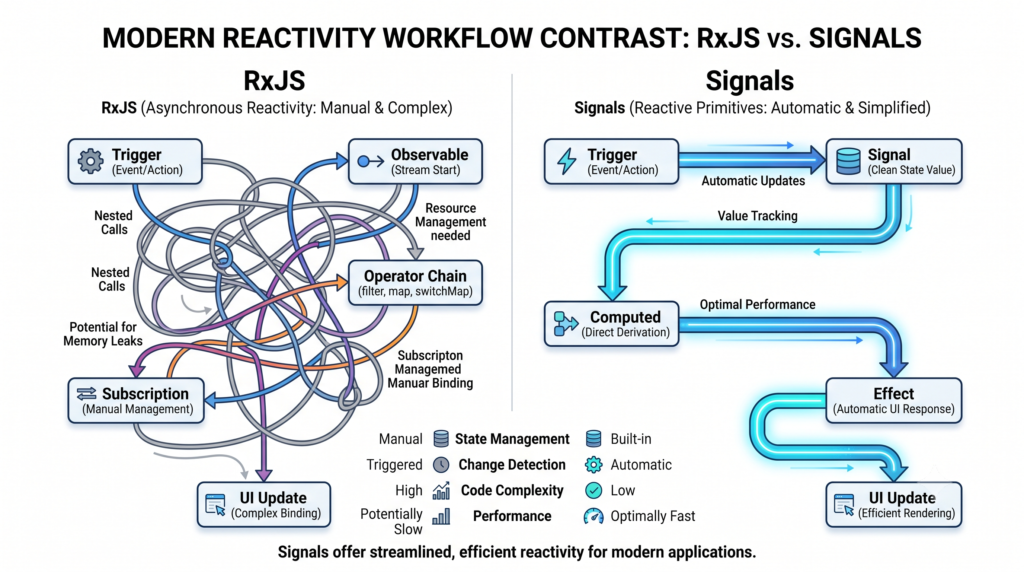
In previous releases, combining asynchronous data with signals required manual interop bridges. For example, developers routinely used toSignal() with RxJS pipes to handle loading states.
TypeScript
// Legacy approach: Managing separate signals manually
readonly loading = signal(false);
readonly data = toSignal(
  this.http.get<User>('/api/user').pipe(
    tap(() => this.loading.set(false)),
    catchError(err => {
      this.error.set(err);
      return of(null);
    })
  )
);
Furthermore, managing race conditions required operators like switchMap. The Angular 22 Resource API solves this challenge at the framework level. As a result, you no longer need external stores to track asynchronous status flags.
You can read more about core reactivity fundamentals in our Guide to Angular Signals and Reactive Primitives.
Core Mechanics of the Angular 22 Resource API
The basic resource() function accepts a reactive parameter computation alongside an asynchronous loader. First, the parameter computation tracks any dependent signals. Next, the loader executes whenever those tracked signals produce fresh values.
TypeScript
import { Component, signal, resource } from '@angular/core';

@Component({
  selector: 'app-product-detail',
  standalone: true,
  template: `
    @if (productResource.isLoading()) {
      <p>Loading product...</p>
    } @else if (productResource.error()) {
      <p>Error: {{ productResource.error() }}</p>
    } @else {
      <h1>{{ productResource.value()?.title }}</h1>
    }
  `
})
export class ProductDetailComponent {
  productId = signal<number>(1);

  // Define the core resource
  productResource = resource({
    params: () => ({ id: this.productId() }),
    loader: async ({ params, abortSignal }) => {
      const response = await fetch(`/api/products/${params.id}`, {
        signal: abortSignal
      });
      if (!response.ok) throw new Error('Failed to load product');
      return response.json();
    }
  });
}
Importantly, the framework passes an AbortSignal directly into your loader function. Because of this, browser network requests cancel immediately when parameters update rapidly.
Streamlining Async Workflows with httpResource
While resource() works with any asynchronous promise, httpResource provides deep integration with Angular’s HTTP stack. Specifically, it runs requests through standard.
Angular HttpClient Interceptors Documentation
import { Component, signal } from '@angular/core';
import { httpResource } from '@angular/common/http';

@Component({
  selector: 'app-user-profile',
  template: `
    <button (click)="nextUser()">Next User</button>
    <div>User Name: {{ user.value()?.name }}</div>
  `
})
export class UserProfileComponent {
  userId = signal(1);

  // Fully reactive HTTP resource declaration
  user = httpResource<User>(() => `/api/users/${this.userId()}`);

  nextUser() {
    this.userId.update(id => id + 1);
  }
}
Consequently, changing userId instantly triggers a fresh request. Meanwhile, the resource updates its internal isLoading and value signals automatically.

Performance Best Practices for Signals and Resources
To maximize throughput and prevent unnecessary renders, apply these architectural rules:
- Keep Dependencies Minimal: First, track only the exact signals needed for the network call. Extraneous signal reads trigger redundant network traffic.
- Handle Optimistic Updates: In addition, use writable signals to patch resource values locally before server confirmation.
- Enforce Schema Validation: Moreover, validate incoming API structures using standard TypeScript schema parsers like Zod Type Validation Library
import { z } from 'zod';

const UserSchema = z.object({
  id: z.number(),
  name: z.string()
});

// Parse and validate incoming data structures
export const safeUserResource = httpResource(() => '/api/user/current', {
  parse: (data) => UserSchema.parse(data)
});
For advanced state architectures, explore our detailed guide on Enterprise State Management Patterns with Angular.
Frequently Asked Questions
What is the difference between resource and httpResource?
The generic resource() function accepts any promise-returning asynchronous operation. On the other hand, httpResource specifically uses HttpClient to support interceptors, typed responses, and built-in JSON parsing.
Is RxJS completely deprecated in Angular 22?
No, RxJS remains supported for complex event handling, debouncing, and web sockets. However, the Angular 22 Resource API serves as the primary recommended solution for standard read-only asynchronous data fetching.
How does the Angular 22 Resource API handle request cancellation?
The resource passes a standard web AbortSignal into the loader. Therefore, whenever a reactive dependency changes, the engine cancels the active network request before initiating the new call.

![Zoneless Angular 22 Apps: [Ultimate] Performance Guide](https://coregamix.com/wp-content/uploads/2026/08/Gemini_Generated_Image_sl7y99sl7y99sl7y-scaled.png)